Air-Gapped Wallets: How They Work and How Secure Are They?
Air-gapped wallets keep your crypto keys offline and away from internet-connected devices. Learn how they work, what they protect you from, and their risks.
The 2026 Coldcard hack raised an important question for Bitcoin users: are air-gapped wallets actually safer? After all, the attack didn’t require physical access to a Coldcard. It exploited a flaw in how some wallets generated their seeds.
That doesn’t mean going offline solves every hardware wallet security problem. An air-gapped wallet keeps your private keys away from internet-connected devices and usually uses QR codes to sign transactions instead. This can reduce certain remote attack paths, but it comes with its own trade-offs.
So what is an air-gapped wallet, how does it work, and what does it actually protect you from? You don’t need to be a security expert to understand it. Let’s break it down.
What Is an Air-Gapped Wallet?
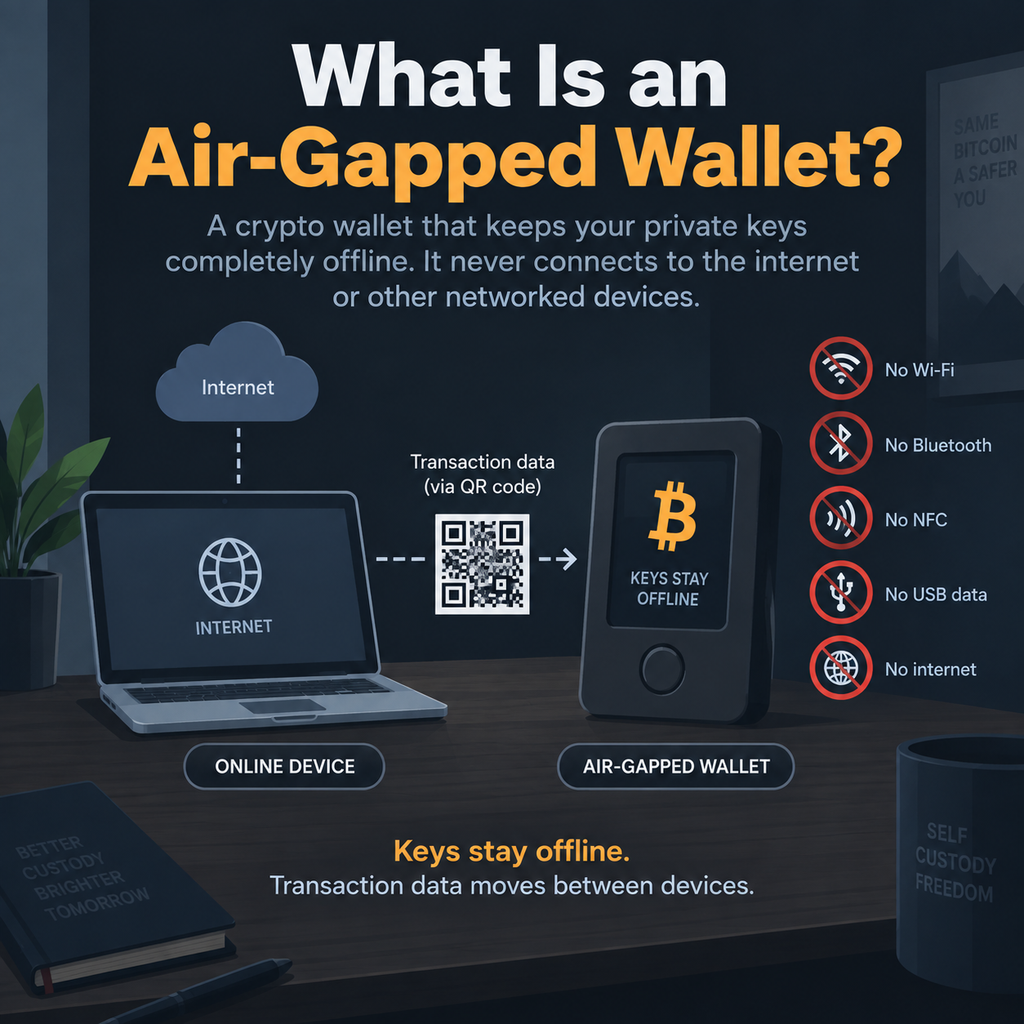
An air-gapped wallet is a crypto wallet that keeps your private keys completely offline. The idea is simple: the device holding your keys never connects to the internet or other networked devices.
But the wallet still needs a way to handle transactions. You can send transaction details to it, usually through a QR code. The wallet signs the transaction while staying offline, then sends the signature back. Another device can broadcast that signed transaction to the blockchain.
What Makes a Wallet Truly Air-Gapped?
A strict air gap means the wallet has no Wi-Fi, Bluetooth, NFC, USB data connection, or internet access.
An offline wallet isn’t necessarily this isolated. It might stay off the internet but still use USB to move transaction data. Also, it might have Bluetooth built in, even if you turn it off. It might also connect to the internet occasionally for firmware updates.
Why Are Air-Gapped Wallets Getting More Attention After the Coldcard Hack?
The Coldcard incident showed why air-gapped wallet security needs to be looked at from more than one angle. The issue involved weak seed generation and entropy in affected firmware. This meant the problem wasn’t caused by the wallet being online.
The bigger lesson is that keeping a wallet offline doesn’t make it automatically secure. You also need to consider how the seed is created, how the firmware works, how private keys are protected, how transactions move between devices, and whether you can verify what you’re signing.
Most importantly, an air gap wouldn’t have prevented this vulnerability. Air-gapping protects communication. It doesn’t guarantee secure firmware or key generation.
How Does an Air-Gapped Wallet Work?
So, how does an air-gapped wallet work in practice? The easiest way to understand it is with a Bitcoin transaction. You use two devices: one that can go online and another that stays offline with your private keys.
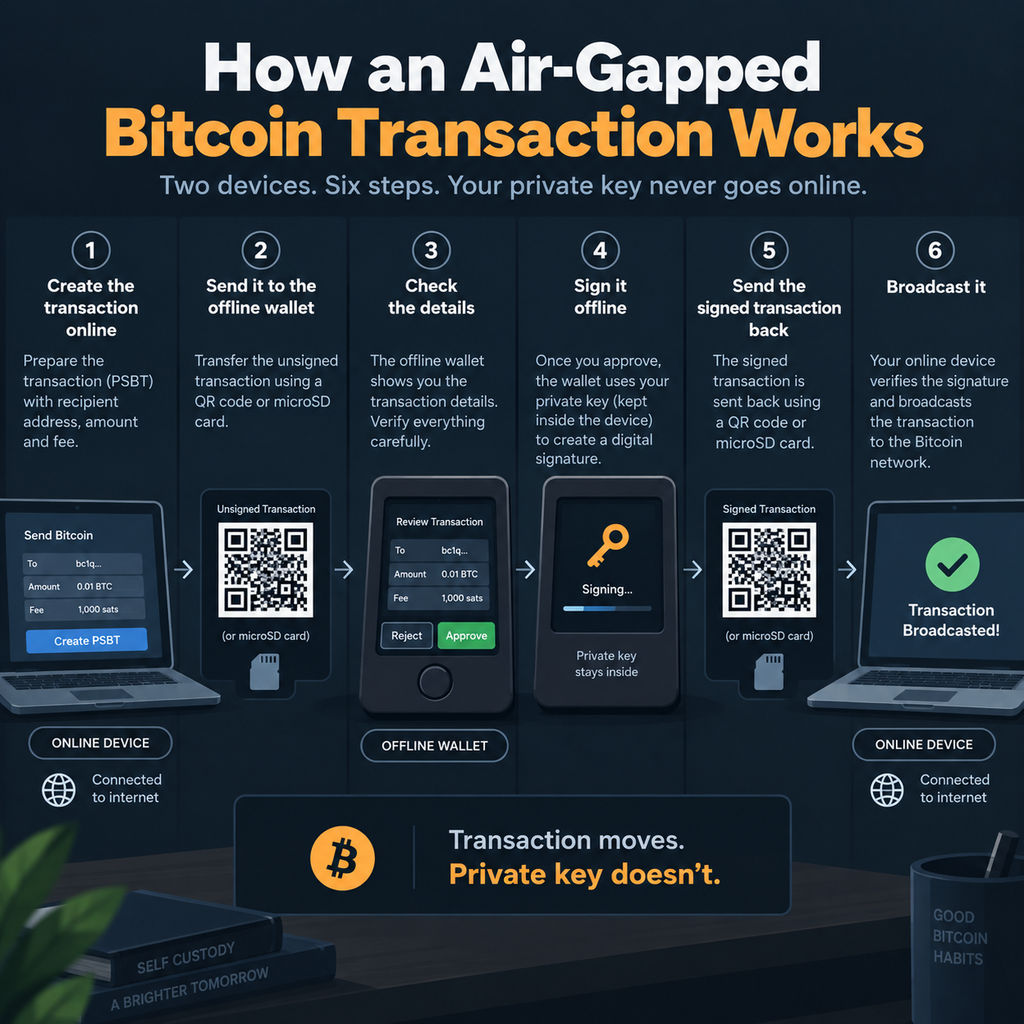
Step 1: Create the Transaction Online
Your online wallet first puts the transaction together. It includes the recipient’s address, the amount, the Bitcoin you’re spending, and the transaction fee. Your private key isn’t needed yet. The transaction is usually prepared as a PSBT, or Partially Signed Bitcoin Transaction, which is simply a file that contains the transaction details and is waiting for a signature.
Step 2: Send It to the Offline Wallet
You then move this unsigned transaction to the offline wallet using a QR code or microSD card. With QR codes, your online device displays the transaction as a QR code, and the offline wallet scans it. The offline wallet can now see the transaction without connecting to the internet.
Step 3: Check the Details
The offline wallet shows you what you’re about to approve, including where the Bitcoin is going, how much you’re sending, and the transaction fee. Check these details carefully before signing. This is important because the offline wallet is your final chance to catch a malicious or incorrect transaction.
Step 4: Sign It Offline
Once you approve the transaction, the air-gapped wallet uses your private key to create a digital signature. Think of this as a mathematical proof that says, “The person authorizing this transaction has the private key that controls these Bitcoin.”
The important part is that the wallet uses the private key inside the device. The key itself never leaves the wallet and never goes online. Only the signature is produced from it.
Step 5: Send the Signed Transaction Back
The signed transaction is then sent back to your online device, usually through a QR code. Your online device doesn’t need your private key to verify it. It uses your public key and the digital signature to check that the transaction was actually authorized by the person who controls the Bitcoin.
If the signature is valid, the online device can broadcast the transaction to the Bitcoin network. The private key remains safely on the offline wallet throughout the process.
Step 6: Broadcast It
Finally, your online wallet broadcasts the signed transaction to the Bitcoin network. Your private key never had to leave the offline wallet.
Air-Gapped Wallet vs. Hardware Wallet?
The main difference between an air-gapped wallet vs a hardware wallet comes down to how the device communicates with other devices.
A hardware wallet keeps your private keys on dedicated hardware, but it may use USB, Bluetooth, NFC, or another electronic connection to communicate with your computer or phone.
A strict air-gapped hardware wallet takes this further. It doesn’t use those electronic connections for data transfer. Instead, it can rely on QR codes, microSD cards, or manual transfers to move transaction data.
Read our in-depth guide on hardware wallets to learn more.
Air-Gapped Wallet vs Cold Wallet: What’s the Difference?
The easiest way to understand the air-gapped wallet vs. cold wallet difference is to think of cold storage as the bigger category.
A cold wallet is any wallet where the private keys are kept offline. That can include hardware wallets, paper wallets, and other offline setups. Read our in-depth guide on cold vs. hot wallets to learn more.
An air-gapped wallet is more specific. It keeps the signing device isolated from electronic networks and uses methods such as QR codes or microSD cards to move transaction data.
So, all strictly air-gapped wallets can be considered cold-storage solutions, but not every cold wallet is air-gapped.
The same idea applies when comparing air-gapped vs. hardware wallet or cold storage vs. air gap. Air-gapping describes the device’s communication setup, while cold storage describes where the private keys are kept.
Advantages and Disadvantages of Air-Gapped Wallets
If you’re considering an air-gapped wallet, there are some clear security benefits. But there are also trade-offs. An air gap can reduce certain risks, but it won’t protect you from every way a crypto wallet can be compromised.
Advantages of Air-Gapped Wallets
The biggest advantage is that your signing device has fewer ways to be attacked remotely. Without Wi-Fi, Bluetooth, NFC, or USB data connections, malware on your computer can’t directly communicate with the wallet through those channels.
Your private keys also stay on the offline device. This gives you a clear separation between signing and broadcasting. One device prepares and broadcasts the transaction, while the other signs it.
That can make an air-gapped wallet useful for large, long-term holdings, especially if you don’t make frequent transactions.
Disadvantages and Risks of Air-Gapped Wallets
The downside is that they’re more complicated to use. More steps also mean more chances to make a mistake, such as approving the wrong transaction or mishandling your backup.
An offline wallet can still receive malicious transaction data through QR codes or removable media. The air gap can’t tell you whether the transaction itself is legitimate.
Firmware flaws, supply-chain attacks, stolen seed phrases, and poor backups can also put your funds at risk.
The bottom line: Air-gapping reduces one specific kind of attack. It doesn’t eliminate the wider risks of crypto self-custody.
What Does an Air Gap Protect You From, and What Doesn’t It?
An air-gapped wallet is useful against attacks that rely on electronic communication with the signing device. However, it doesn’t protect you from every security problem.
| Threat | Does air-gapping help? |
| Remote malware | Yes |
| Internet-based attacks | Yes |
| Direct network attacks | Yes |
| USB attacks | Yes, if there’s no USB data |
| Bluetooth attacks | Yes, if Bluetooth is absent |
| Phishing | No |
| Stolen seed phrase | No |
| Malicious firmware | No |
| Supply-chain attacks | No |
| Physical theft | No |
| Wrong transaction approval | No |
| Poor seed generation | No |
| Social engineering | No |
Who Should Use an Air-Gapped Wallet?
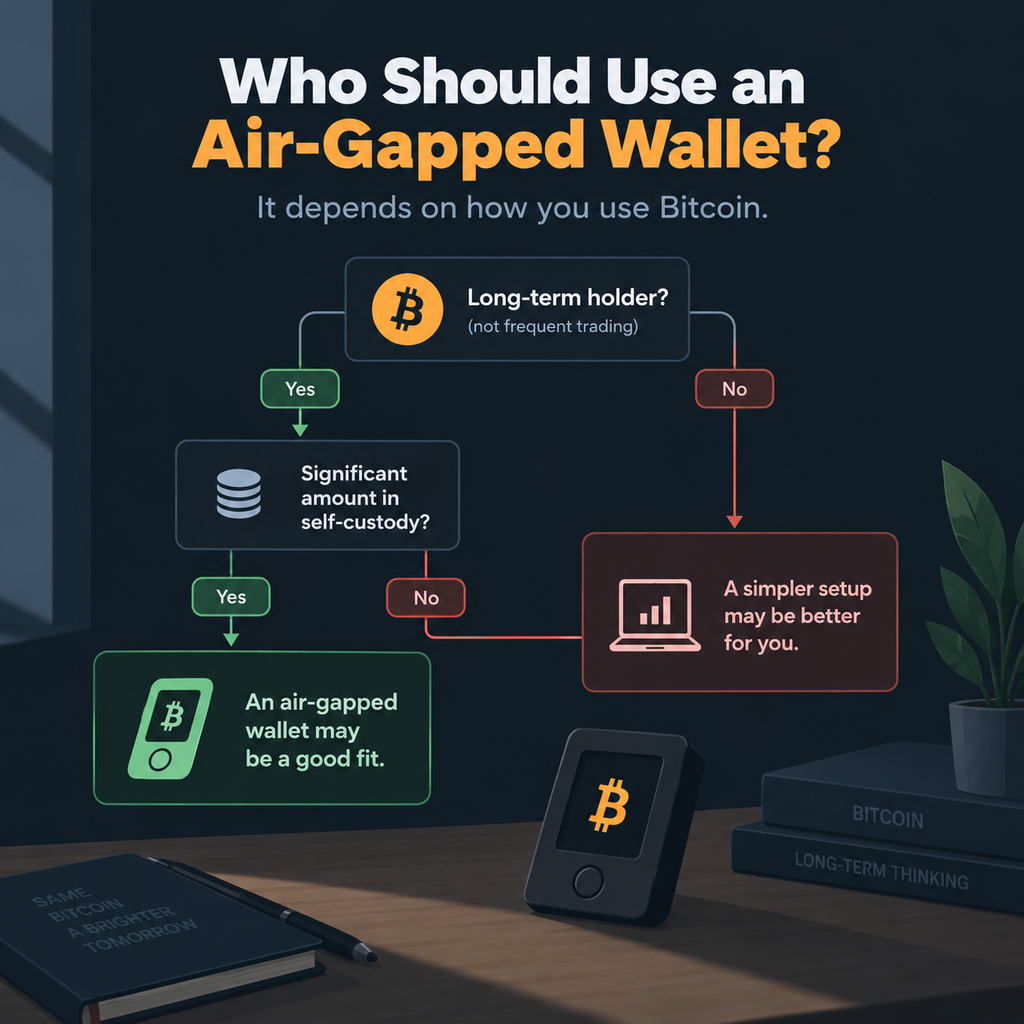
An air-gapped wallet makes the most sense if you care more about keeping your keys isolated than having the most convenient setup.
It’s especially useful if you’re holding Bitcoin for a long time, keeping a large amount in self-custody, or don’t make transactions very often. But you also need to be comfortable managing backups and following a few extra steps.
If you’re constantly trading or you’re new to self-custody, an air-gapped setup may feel like more work than it’s worth. More steps also mean more chances to make a mistake.
If you’re holding a very large amount, you can go a step further with multisig, separate backups, multiple signing devices, or an inheritance plan. An air gap is just one layer of security, not the whole setup.
Frequently Asked Questions
1. Can an air-gapped wallet receive cryptocurrency?
Yes. An air-gapped crypto wallet can receive cryptocurrency without connecting to the internet. You only need to share your public receiving address with the sender. The wallet doesn’t need to be online to receive funds because the blockchain records the transaction independently.
2. Can an air-gapped wallet work without a computer?
Yes. Some air-gapped wallets can work with a smartphone or another compatible device instead of a traditional computer. The key is how transaction data moves between the devices. If the wallet uses QR codes or removable storage instead of USB, Bluetooth, Wi-Fi, or NFC, it can maintain the air gap while still allowing you to create and sign transactions.
3. Can you update an air-gapped wallet?
Yes, but the process depends on the device. Some wallets let you download firmware onto removable media and install it while remaining offline. Others use a different verification process. You should follow the manufacturer’s instructions and verify firmware authenticity before installing anything. An update should never require you to expose your recovery phrase or private keys.